 Image 1 of 1
Editable Wedding Door Hanger Template | Bride & Groom Wedding Door Signs | Canva Template
$4.99
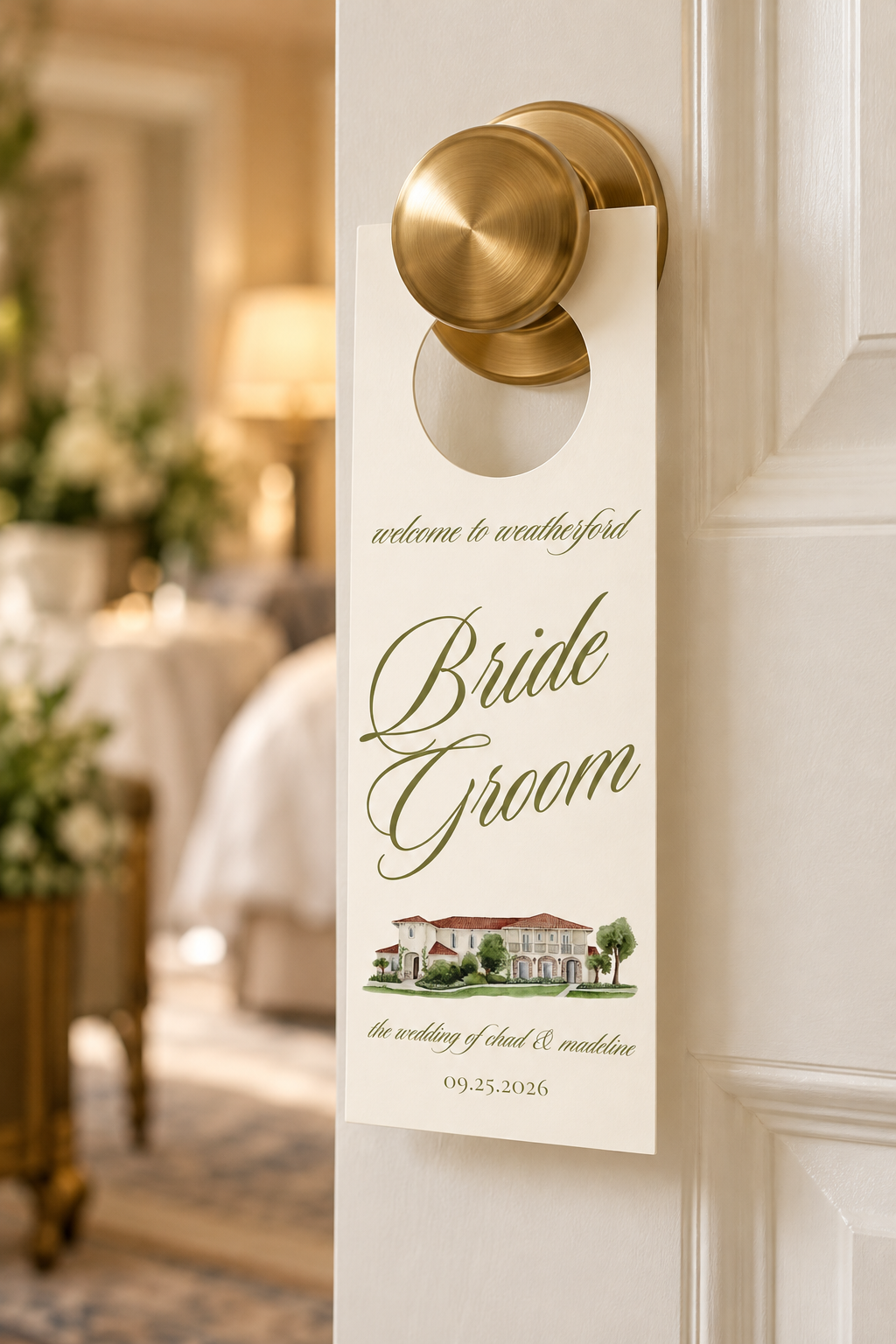
Add a personalized, elegant touch to your wedding weekend with these editable wedding door hanger templates!
Featuring romantic olive green calligraphy, a minimalist ivory background, and space for a custom wedding venue illustration, these door hangers are a beautiful way to welcome your wedding party and celebrate your special day.
Perfect for bridal suites, groom's rooms, hotel room doors, and wedding weekend accommodations, these customizable hangers add a thoughtful detail to your wedding festivities.
Personalize your design in Canva with your wedding location, names, date, and custom wording. Print at home, use a professional printing service, or create your own door hangers using a Cricut cutting machine!
WHAT'S INCLUDED
1 editable wedding door hanger Canva template
Elegant olive green and ivory design
Customizable Bride and Groom wording
Editable wedding location, names, and date
Space to personalize or replace the venue illustration
Digital Canva template access
Instant digital download
SIZE & DIMENSIONS
Template size: 8 cm W × 20 cm H
Approximately 3.15" W × 7.87" H
Tall, slim rectangular design
Fully editable in Canva
Download as PDF Print for home or professional printing
Download as JPEG (JPG) for use with Cricut Design Space
HOW IT WORKS
Purchase this listing.
Download the PDF containing your Canva template link.
Open the template in Canva.
Customize the wedding location, names, date, wording, colors, and other editable elements.
Duplicate the design to create personalized Bride, Groom, or wedding party door hangers.
Download your finished design in your preferred format:
PDF Print: Ideal for printing at home or through a professional printing service.
JPEG (JPG): Ideal for uploading into Cricut Design Space for cutting.
Print, cut, and create the opening for your door handle.
CRICUT FRIENDLY — CUSTOM DOOR HANDLE CUTOUT
Want to create professional-looking door hangers using your Cricut? You can customize the door handle opening directly in Cricut Design Space!
Customize your door hanger in Canva and download it as a JPEG (JPG).
Upload your finished design into Cricut Design Space.
Set up the design for Print Then Cut, making sure the final dimensions are correct.
Add a circle shape in Cricut Design Space where you want the door handle opening.
Position and resize the circle to fit your desired door handle.
Use the Slice feature to subtract the circle from the hanger shape. A closed circular opening can be created this way; add an appropriate slit or opening if you want the hanger to slide onto a handle without removing the knob.
Print and cut your door hangers using compatible cardstock and your Cricut machine.
IMPORTANT: The finished template measures 8 × 20 cm. Depending on your Cricut machine and paper size, the design may exceed the available Print Then Cut area. Please verify compatibility before printing.
PERFECT FOR
Bride and Groom wedding door hangers
Bridal suite decorations
Groom's getting-ready room
Wedding hotel room doors
Wedding party welcome gifts
Destination weddings
Wedding weekend accommodations
Personalized wedding details
Elegant and romantic weddings
DIY wedding stationery
Cricut wedding projects
PLEASE NOTE
This is a DIGITAL DOWNLOAD. No physical product will be shipped.
A free Canva account may be used for editing, provided no Canva Pro elements are required.
The door handle cutout may need to be created separately in Cricut Design Space or cut manually.
Printing, cardstock, cutting supplies, and Cricut machines are not included.
Any custom venue illustration must be supplied by the buyer; a personalized illustration is not included.
Printed colors may vary slightly depending on your printer, paper, and screen settings.
This template is for personal use only. Reselling, redistributing, or sharing the original or modified digital template is not permitted.
Create a beautiful, personalized wedding weekend detail with elegant door hangers that make your getting-ready spaces feel extra special!
Add a personalized, elegant touch to your wedding weekend with these editable wedding door hanger templates!
Featuring romantic olive green calligraphy, a minimalist ivory background, and space for a custom wedding venue illustration, these door hangers are a beautiful way to welcome your wedding party and celebrate your special day.
Perfect for bridal suites, groom's rooms, hotel room doors, and wedding weekend accommodations, these customizable hangers add a thoughtful detail to your wedding festivities.
Personalize your design in Canva with your wedding location, names, date, and custom wording. Print at home, use a professional printing service, or create your own door hangers using a Cricut cutting machine!
WHAT'S INCLUDED
1 editable wedding door hanger Canva template
Elegant olive green and ivory design
Customizable Bride and Groom wording
Editable wedding location, names, and date
Space to personalize or replace the venue illustration
Digital Canva template access
Instant digital download
SIZE & DIMENSIONS
Template size: 8 cm W × 20 cm H
Approximately 3.15" W × 7.87" H
Tall, slim rectangular design
Fully editable in Canva
Download as PDF Print for home or professional printing
Download as JPEG (JPG) for use with Cricut Design Space
HOW IT WORKS
Purchase this listing.
Download the PDF containing your Canva template link.
Open the template in Canva.
Customize the wedding location, names, date, wording, colors, and other editable elements.
Duplicate the design to create personalized Bride, Groom, or wedding party door hangers.
Download your finished design in your preferred format:
PDF Print: Ideal for printing at home or through a professional printing service.
JPEG (JPG): Ideal for uploading into Cricut Design Space for cutting.
Print, cut, and create the opening for your door handle.
CRICUT FRIENDLY — CUSTOM DOOR HANDLE CUTOUT
Want to create professional-looking door hangers using your Cricut? You can customize the door handle opening directly in Cricut Design Space!
Customize your door hanger in Canva and download it as a JPEG (JPG).
Upload your finished design into Cricut Design Space.
Set up the design for Print Then Cut, making sure the final dimensions are correct.
Add a circle shape in Cricut Design Space where you want the door handle opening.
Position and resize the circle to fit your desired door handle.
Use the Slice feature to subtract the circle from the hanger shape. A closed circular opening can be created this way; add an appropriate slit or opening if you want the hanger to slide onto a handle without removing the knob.
Print and cut your door hangers using compatible cardstock and your Cricut machine.
IMPORTANT: The finished template measures 8 × 20 cm. Depending on your Cricut machine and paper size, the design may exceed the available Print Then Cut area. Please verify compatibility before printing.
PERFECT FOR
Bride and Groom wedding door hangers
Bridal suite decorations
Groom's getting-ready room
Wedding hotel room doors
Wedding party welcome gifts
Destination weddings
Wedding weekend accommodations
Personalized wedding details
Elegant and romantic weddings
DIY wedding stationery
Cricut wedding projects
PLEASE NOTE
This is a DIGITAL DOWNLOAD. No physical product will be shipped.
A free Canva account may be used for editing, provided no Canva Pro elements are required.
The door handle cutout may need to be created separately in Cricut Design Space or cut manually.
Printing, cardstock, cutting supplies, and Cricut machines are not included.
Any custom venue illustration must be supplied by the buyer; a personalized illustration is not included.
Printed colors may vary slightly depending on your printer, paper, and screen settings.
This template is for personal use only. Reselling, redistributing, or sharing the original or modified digital template is not permitted.
Create a beautiful, personalized wedding weekend detail with elegant door hangers that make your getting-ready spaces feel extra special!